
Download ProductKit – AI‑Powered Testimonial Tool for Higher Conversions
Overview of ProductKit
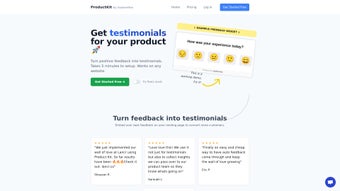
ProductKit is an AI‑driven software solution designed to transform website visitors into loyal customers by harnessing the persuasive power of authentic customer testimonials. In today’s digital marketplace, trust is the most valuable currency, and ProductKit delivers that trust through a seamless, five‑minute setup that integrates effortlessly with popular e‑commerce and website platforms such as Shopify, Squarespace, Framer, and WordPress. The tool’s core mission is to provide businesses with a secure, customizable, and data‑backed way to showcase real‑world feedback, turning social proof into a conversion engine.
What sets ProductKit apart from generic testimonial widgets is its intelligent approach to content curation. Using natural language processing, the platform automatically extracts the most compelling snippets from raw customer reviews, highlights key details like user names, locations, and product specifics, and then presents them in a visually appealing format that matches your brand’s aesthetic. Users retain full editorial control through a manual approval system, guaranteeing that only high‑quality, on‑brand testimonials appear on the site. This dual‑layer of AI assistance and human oversight ensures that every displayed review strengthens credibility while complying with any regulatory or privacy requirements.
Beyond static display, ProductKit includes a live demo environment that demonstrates, with real‑time analytics, how strategically placed testimonials can lift conversion rates by up to 30 % in certain industries. The demo acts as both a proof‑of‑concept for skeptical stakeholders and a training tool for marketing teams learning to leverage social proof effectively. Whether you’re a small boutique shop or a multi‑national brand, ProductKit offers a scalable, secure, and cost‑effective solution to amplify trust, increase engagement, and ultimately drive revenue.
Key Features that Power Trust and Conversions
- AI‑Generated Highlight Extraction: Automatically identifies the most persuasive sentences from customer reviews, focusing on metrics such as satisfaction scores, product benefits, and unique use cases.
- Cross‑Platform Integration: One‑click connectors for Shopify, Squarespace, Framer, and WordPress, with webhook support for custom CMS environments.
- Full Customization Suite: Adjust fonts, colors, layout styles, and add personal details like customer name, location, and purchase date to make each testimonial feel authentic.
- Manual Approval Workflow: A moderator dashboard lets you review, edit, or reject testimonials before they go live, ensuring brand consistency and legal compliance.
- Live Conversion Demo: Interactive demo that visualizes potential lift in conversion rates based on testimonial placement and density.
- Analytics & Reporting: Real‑time dashboards track impressions, click‑through rates, and revenue impact per testimonial, helping you refine your social proof strategy.
- Secure Data Handling: End‑to‑end encryption for all testimonial data, GDPR‑compliant storage, and role‑based access controls.
- Automatic Updates: The software receives continuous AI model improvements and UI enhancements without manual intervention.
Each feature is built with performance and scalability in mind. For example, the AI engine runs on a cloud‑based microservice architecture, guaranteeing sub‑second response times even for high‑traffic sites. The modular design also means you can enable only the functionalities you need, keeping page load times low and preserving SEO health. Moreover, the analytics module integrates with Google Analytics and popular CRM platforms, allowing you to attribute sales directly to specific testimonial placements—a crucial insight for data‑driven marketers.
ProductKit’s emphasis on security is not an afterthought. All testimonial content is stored in encrypted databases, and the platform adheres to industry‑standard privacy practices. This is especially important for businesses handling sensitive customer data, such as health‑tech or financial services, where a single breach could erode trust instantly. By combining AI efficiency with human oversight, ProductKit delivers a balanced solution that respects both privacy and persuasion.
Installation, Usage & Compatibility
Step‑by‑Step Installation
Getting ProductKit up and running is intentionally straightforward. After purchasing a license (or starting a free trial), you’ll receive a unique API key via email. Follow these steps to embed the tool on your site:
- Create an Account: Sign up on the ProductKit dashboard and verify your email.
- Generate an API Key: Navigate to “Settings → API” and copy the generated token.
- Install the Plugin/Widget: For Shopify, add the ProductKit app from the Shopify App Store; for WordPress, upload the zip file via “Plugins → Add New.” Squarespace and Framer users can paste a small JavaScript snippet into the site header.
- Configure Display Options: Choose your preferred layout (carousel, grid, or single‑quote) and map testimonial fields (name, location, rating) to your design.
- Activate Manual Approval: Turn on the moderator toggle to review each incoming testimonial before it goes live.
- Publish & Test: Save your settings, clear any site cache, and view the widget on a live page. Use the built‑in preview mode to see how testimonials will look on desktop and mobile.
Operating System & Browser Compatibility (itemprop="operatingSystem")
ProductKit is a cloud‑based SaaS platform, which means the backend runs on secure Linux servers and is accessible from any modern browser. It fully supports Windows 10/11, macOS Ventura and later, as well as popular Linux distributions. The front‑end widget is built with responsive HTML5, CSS3, and vanilla JavaScript, ensuring compatibility across Chrome, Firefox, Safari, Edge, and even mobile browsers on Android 13+ and iOS 16+. Because the integration relies on lightweight script tags, page load impact is minimal—typically adding less than 100 ms to the overall page rendering time.
Usage Tips for Maximum Impact
To extract the highest conversion value, consider these best practices:
- Strategic Placement: Position testimonials near the primary call‑to‑action (CTA) or on product detail pages where purchase intent is strongest.
- Rotate Frequently: Use the auto‑rotate feature to keep content fresh and avoid “banner blindness.”
- Leverage Personalization: Enable dynamic fields that pull the visitor’s location or browsing history to show region‑specific reviews.
- Test Variations: Run A/B tests with different testimonial layouts and lengths to discover which format drives the highest click‑through rate.
- Monitor Analytics: Regularly review the built‑in dashboard to identify high‑performing testimonials and replicate their tone or structure in future reviews.
By following the quick installation guide and adhering to these usage strategies, businesses can see a measurable uplift in trust signals within days, not weeks.
Pros, Cons, FAQ & Final Verdict
Pros & Cons
- Pros:
- Fast five‑minute setup saves time and resources.
- AI‑driven content extraction speeds up testimonial curation.
- Manual approval ensures brand safety and compliance.
- Cross‑platform integrations cover the most popular website builders.
- Robust analytics link social proof directly to revenue.
- Secure, GDPR‑compliant data handling builds customer confidence.
- Cons:
- Advanced AI features require an internet connection; offline use is not supported.
- Customization options, while extensive, may need basic CSS knowledge for deep styling.
- Pricing tiers can be a hurdle for very small startups with limited budgets.
Frequently Asked Questions
How long does it take to see a conversion lift after installing ProductKit?
Most users report a noticeable increase in conversion rates within 1‑2 weeks, especially after running a few A/B tests to optimize placement and layout.
Can I import existing testimonials from a CSV file?
Yes, the dashboard includes a bulk import tool that accepts CSV, JSON, or Excel formats, allowing you to migrate legacy reviews quickly.
Is there a free trial or freemium version?
ProductKit offers a 14‑day free trial with full feature access, so you can evaluate its impact before committing to a paid plan.
How does ProductKit ensure testimonial authenticity?
The platform integrates with major review platforms (e.g., Trustpilot, Google Reviews) via API verification, and the manual approval step lets you validate each entry manually.
What support channels are available?
Customers receive 24/7 email support, live chat during business hours, and access to a comprehensive knowledge base with video tutorials.
Conclusion & Call to Action
ProductKit delivers a compelling blend of AI efficiency, human oversight, and robust analytics that makes it one of the most effective testimonial tools on the market today. Its rapid five‑minute setup, seamless integration with leading e‑commerce platforms, and secure data handling address the core pain points of businesses looking to boost credibility without sacrificing control. While the price point may be a consideration for micro‑businesses, the measurable lift in conversion rates and the ability to tie social proof directly to revenue provide a clear ROI.
If you’re ready to turn satisfied customers into persuasive sales assets, download ProductKit now and start building trust that converts. Take advantage of the 14‑day free trial, explore the demo, and see firsthand how intelligent testimonials can reshape your online performance.



.png)



